|
|

|
HOME → SALAT-O-MATIC MOBILE
Take salat-o-matic with you!
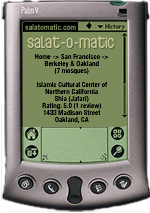 If you have a PDA or Internet-enabled mobile phone, you can enjoy salat-o-matic listings wherever you are! Each guide offers information on mosques in major metropolitan areas, including addresses, phone numbers, and salat-o-matic reader ratings. Installing salat-o-matic on your handheld is easy! Just follow these simple steps: If you have a PDA or Internet-enabled mobile phone, you can enjoy salat-o-matic listings wherever you are! Each guide offers information on mosques in major metropolitan areas, including addresses, phone numbers, and salat-o-matic reader ratings. Installing salat-o-matic on your handheld is easy! Just follow these simple steps:
Option 1: Wireless PDA & Web-enabled phone users: - If you have an Internet-enabled mobile device, just point your browser to https://salatomatic.com - that's all! You'll have instant access to salat-o-matic listings & reviews for major metropolitan areas around the world.
 Option 2: Get an AvantGo account - If you have a Palm® or PocketPC device without wireless access, register with AvantGo and download the AvantGo software installer for your handheld computer. Once you have AvantGo installed, click on the metropolitan area you're interested in: Option 2: Get an AvantGo account - If you have a Palm® or PocketPC device without wireless access, register with AvantGo and download the AvantGo software installer for your handheld computer. Once you have AvantGo installed, click on the metropolitan area you're interested in:
Install the selected salat-o-matic City Guide on your PDA - If you like what you see on the city guide listed in the previous step, just click on the salat-o-matic logo on the top of the City Guide of your choosing. At the bottom of the next page, click on the "Save Channel" button to save the page to your AvantGo account.
That's it! You can install multiple City Guides on your handheld by simply repeating the steps above for each metropolitan area. Have any ideas on how we can improve this service? Contact us with your comments and suggestions.
|
|
|
|
